Steps to setup G-Sites to meter readings
Take Greencedar for example:
1. First,open the Series2000 BackOffice Management.net and choose the database “Greencedar”.
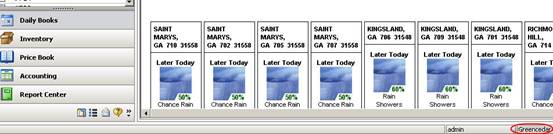
2. Click “System And Security” button on the bottom and you will see the “Load LogMeIn Accounts” button.

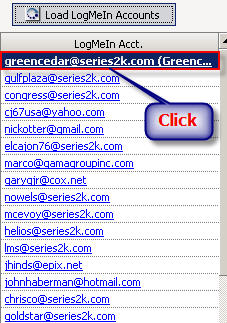
3. After clicking the Load LogMeIn Accounts” button, you’ll get the screen as the following picture:
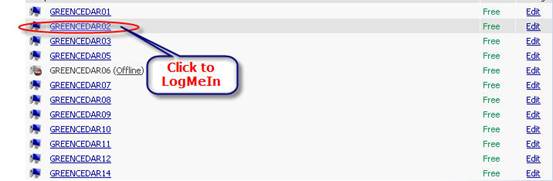
4. Then choose one to LogMeIn. For example, click “GREENCEDAR02” to LogMeIn.
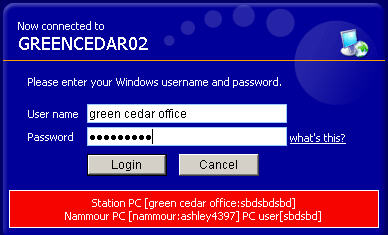
5. Imput the correct “User Name” and “Password”, and then click the “Login” button.
6. Click “GO”
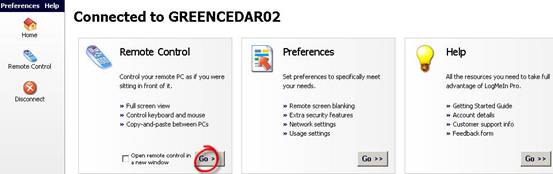
7. Click “Login” on the left of the bottom.
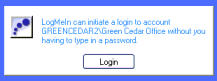
8. Open the S2K Client and click the “Setting” botton, you’ll get the picture as bellow:
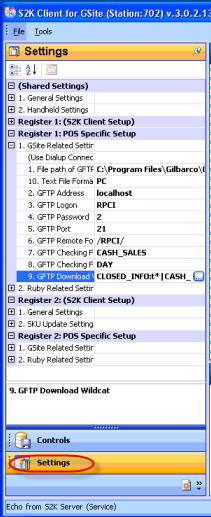
9. Click the white botton in the “GsiteRelated Settings”.
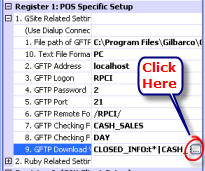
10. Find “FUEL_SALES”, and make the FileFilter to “DAY*,FORMAT*”.
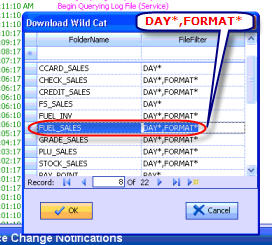
11. Then click OK to save the modification.

12. Lastly click “disconnect”.
loans loans loans loans loans loans loans loans loans loans loans loans loans loans loans loans loans loans loans loans loans loans loans loans loans loans loans loans loans loans loans loans loansloans loans loans loans loans loans loans insurance insurance mortgage mortgage