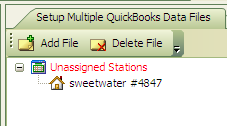
Settings in acctg for QB-
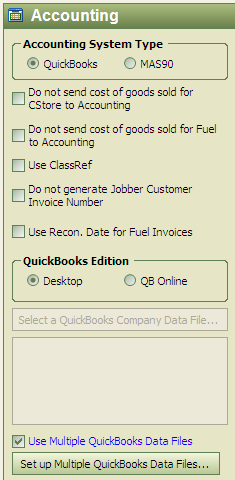
a) Do not send COGS for C-Store to Accounting: When we send over C-Store sales transactions to QB, will only send sales, not inventory reduction or COG INCREASE. Will show a 100% profit in QB
b) Do not send COGS for Fuel to Accounting: When we send over Fuel sales transactions to QB, will only send sales, not inventory reduction or COG INCREASE. Will show a 100% profit in QB
c) Use ClassRef:
If running multiple stores, this box should be checked, station ID used in QB
d) Do not generate Jobber Customer Inv. #: For Jobbers only (SEND GORDON EMAIL TO REMOVE FROM NON-JOBBER SITES)
e) Use Recon Date for Fuel Invoices-
a. Currently for BP use Only- will use delivery (recon) date on fuel invoices since BP invoices may be dated a couple days after delivery.
f) QuickBooks Edition: Desktop or QB Online
QuickBooks Data File (option comes up when desktop version is selected)- File--open previous company, which will show you where the file was saved last.
g) Setup Multiple QuickBooks Data Files
a. Add all QB data files here and then click and drag which stations you want under which data file.